Running a show
9 min
The live dashboard
Use the live monitor, segment queue, audience features, show notes, and show controls while you are on air.
How the screen is laid out
On a wide screen, the live dashboard places the room monitor on the left and the controls on the right. On a smaller screen, the same panels stack into one column.
The monitor shows the active segment, interest score, audience, votes cast, and vote-expiry setting. Use the right column to steer the live room: change segments, reset votes, run audience features, and end the show. Show notes and the sponsor preview sit below the monitor because they benefit from the wider column and remain editable.
Put it on a second screen
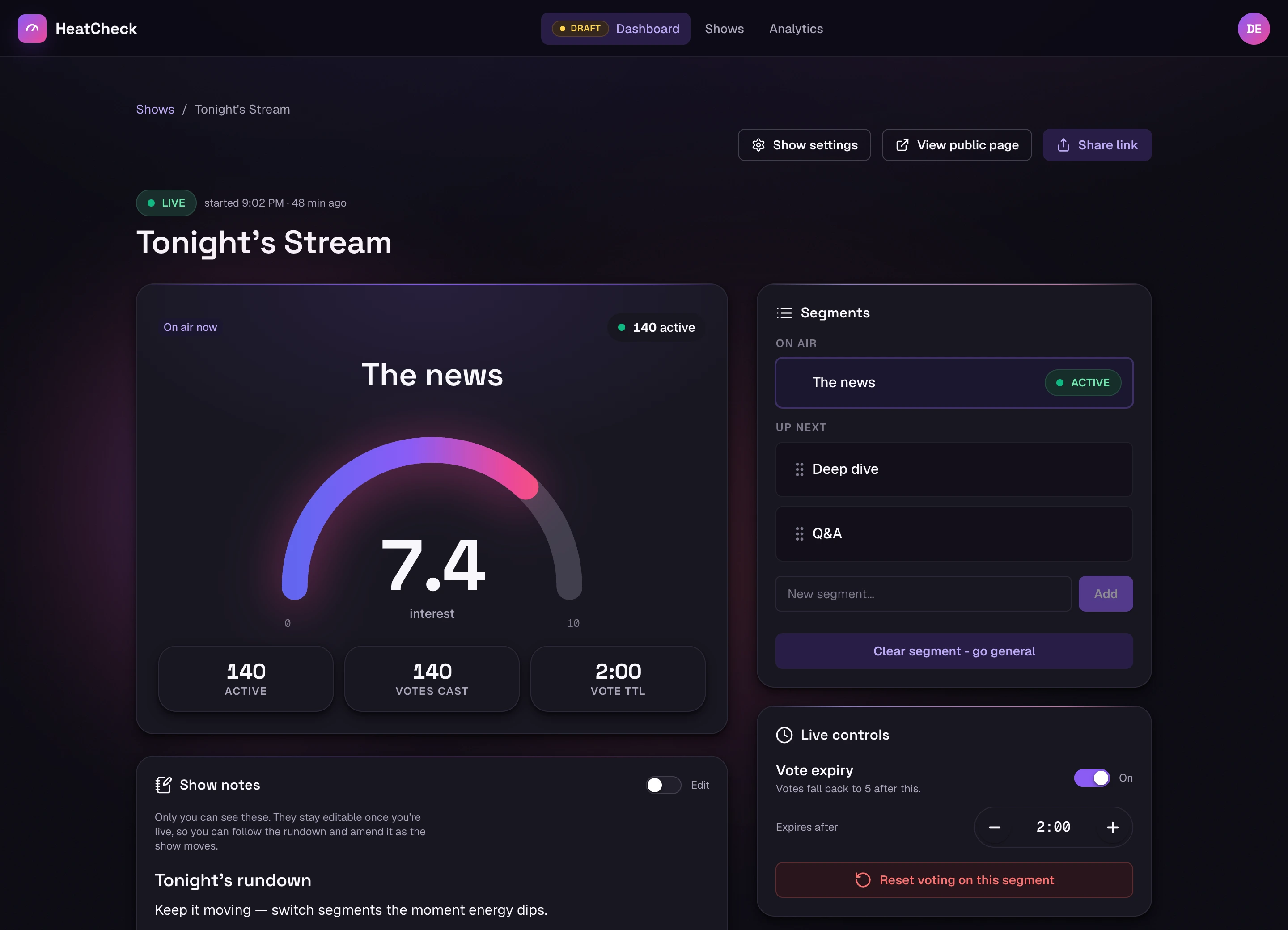
The monitor
The left column, top to bottom:
The gauge
- Average interest across everyone currently in the room, 1–10. Someone present who has not voted counts as 5, so a fresh room starts near the middle and moves as people actually vote.
The current segment
- What the room is rating now. With no segment active, the monitor shows the show name or “general discussion.”
Audience counts
- How many people are in the room, and how many of them have voted. Someone drops out of the count about 30 seconds after closing the page.
Audience count is a recent-presence estimate
Segments
This panel holds the segment currently on air, the queue, and the segments covered during this browser session. Choose Activatebeside a queued segment to put it on air.
- Activating a segment resets the scores for the new one. Previous segments keep theirs; nothing is lost.
- Choose Clear segment - go general to return to the show name or general discussion between planned segments.
- You can add a segment mid-show. It is faster to plan them in the draft, but nothing stops you typing one live.
Use a segment whenever you want a separate result in analytics. A show left on general discussion produces one broad result; activating named segments lets you compare those parts of the show later.
Live controls
These controls change how votes contribute to the current segment.
Reset votes
- Clears every vote for the current segment and starts it over. For when you asked the wrong question, or a segment changed direction halfway through and the score no longer means anything.
Vote expiry
Default 2 min · 30 sec–10 min
- Returns a vote to the neutral score of 5 after the selected time unless the listener votes again. This keeps the gauge focused on recent feedback. It starts enabled at two minutes for a new host unless you change your defaults.
When vote expiry earns its keep
The feature panels
The dashboard keeps each live workflow in its own panel. Roll call, suggestions, ads, and live video have per-show settings; polls, overlays, and show notes expose the actions relevant to that feature.
Roll call
- The check-in race. Switch it on and listeners can check in; the panel shows the running order and lets you remove or ban someone. Standings are banked when you end the show.
Listener suggestions
- Lets signed-in listeners propose segments and upvote each other’s ideas. Put an idea on air immediately, add it to the queue, or remove it.
Polls
- Launch a multiple-choice or 1–10 rating question, watch the live result, then close and reveal it or cancel it.
Ads
- Turns sponsors on for this show, and picks how prominent they are. Build and activate the creatives in Settings → Ads.
Stream overlays
- Quick access to your overlay URLs so you can copy one without leaving the show. Build and manage the arrangements in Settings → Stream overlays.
Live video
- Shows your YouTube stream and its chat on your listener page, so the whole audience experience is on one screen. Connect the channel in Settings → Integrations.
Show notes
- A private rich-text pad or embedded Notion page for your running order and production notes.
You can hide panels you never use
Ending the show
Stopping closes voting and the active segment. It also settlesthe roll call, banking points, streaks, and badges, and marks the show complete for analytics. You cannot reopen a stopped show.
Do not just close the tab
What happens to the ephemeral stuff
Live presence, vote state, poll counters, suggestions, and the check-in race use temporary storage while the show runs. HeatCheck keeps the durable outcomes it needs later, including segment results, closed-poll results, settled roll-call standings, and sponsor clicks.